Customer feedback board
Be the PM who knows why.
Your customers post requests and vote on a board of your own. Outcomify turns every request into the need behind it: how many customers share it, which ones, and whether anything you're building answers it. Walk into planning with reasons, not a vote count.
The board is free. No credit card required.
MCP-enabled: Claude or any MCP client can read and work your boardEvery month I copy the numbers into a spreadsheet by hand so our accountant can close the books.
- Get month-end numbers to our accountantHeard from 11 customers
- Share results with people who don't log inHeard from 6 customers
Why it matters
Win the room. Keep the customer.
A board is only worth running if it makes you better at the conversations that follow it.
In the planning meeting
Reasons, not a leaderboard
“38 votes for Excel export” becomes “eleven customers can't get their month-end numbers to their accountant, and nothing on our roadmap solves it.” That's the sentence that wins the argument, and you're the one who says it.
With your customers
Everyone hears back
Every person who asked hears from you in your own words: when it’s planned, when it ships, and when it’s a no. You become the vendor who listens.
When you have to say no
A no that keeps the customer
A no with a reason keeps the relationship, and the request still counts as evidence the next time the same need comes up. You can change your mind later.
How it works
From a request to the reason behind it.
The board collects requests like any other. What happens after you approve one is the part other boards don’t do.
Customers post and vote
On the board’s own public page or embedded in your product. They arrive signed in through your login, or sign in with an email code if you allow it.
You decide what goes up
New requests wait for your approval, or go straight up if you prefer. Anything that looks like spam waits for a person either way.
Requests become evidence
Approve a request and Canopy reads it into the needs in your research, next to your interviews and tickets. The same need is counted once, however many ways people ask for it.
See what answers each need
Every request shows the opportunities in your trees that cite its needs. A need several customers share that nothing is working on stands out.
The inbox
Every request, with the need behind it.
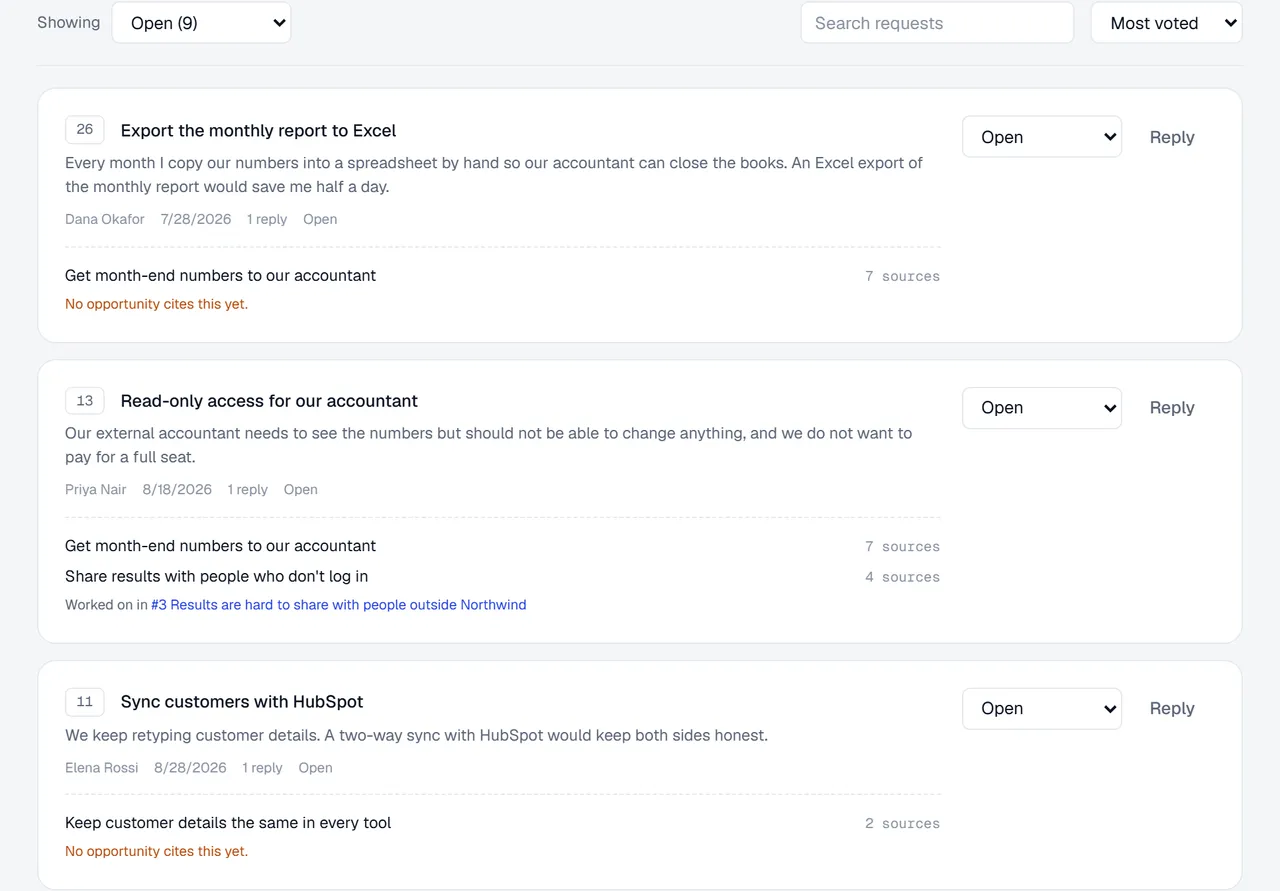
Each request shows the needs it turned out to be, how much evidence stands behind each one, and the opportunity working on it. When nothing is, it says so.
One need, many requests
“Export to Excel”, “email the report” and “access for our accountant” turn out to be the same need, counted once.
The gap, in plain words
“No opportunity cites this yet” marks a well-supported need nothing on your roadmap answers.
Straight to the work
“Worked on in #3” opens the opportunity in your tree that is already on it.
What your customers see
A board they'll actually come back to.
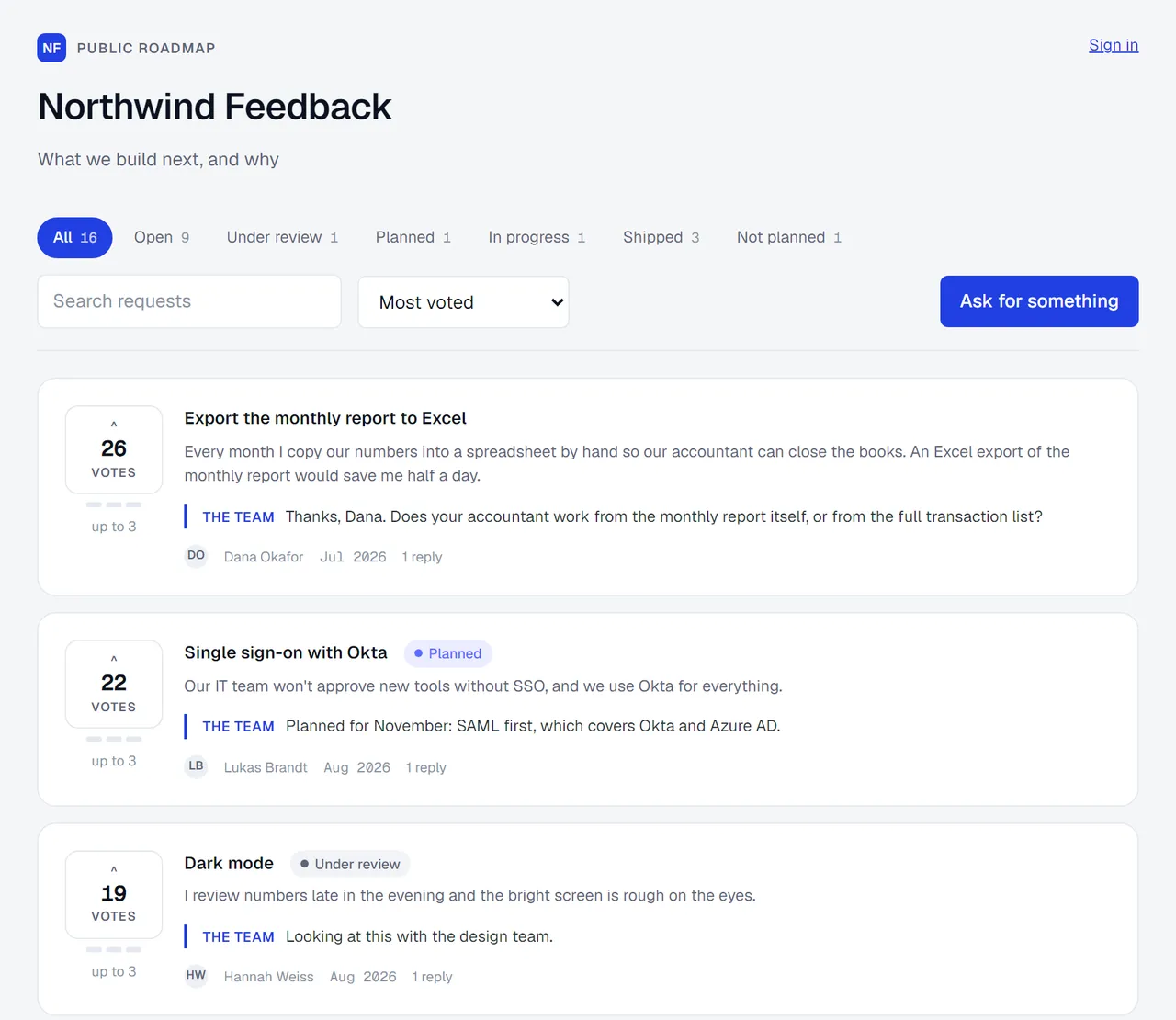
A clean public page with your statuses, the team's replies under each request, and a vote that means something.
Votes mean priority, not popularity
Seven votes each by default, up to three on any one request. A vote says “this is in my top handful”.
Your words, everywhere
Rename the statuses and your customers, their emails and your inbox all use your wording.
On your page, or in your product
Share the board’s address, embed it in your product with a snippet, or keep it private to your own customers.
Close the loop
Replies are the point
Move a request and add a note: it shows on the request and reaches the person who asked by email. Answer a question without moving anything, and the answer travels the same way.
Landing in March, with a sheet per month so it goes straight to your accountant.
Scarce votes
A budget, not a like button
When voting is free, people vote for everything and the count stops meaning much. With a budget, customers show you what they'd pick first.
- Export the monthly report to Excel
- Single sign-on for our team
- Dark mode
Board report
Know whether your board is working.
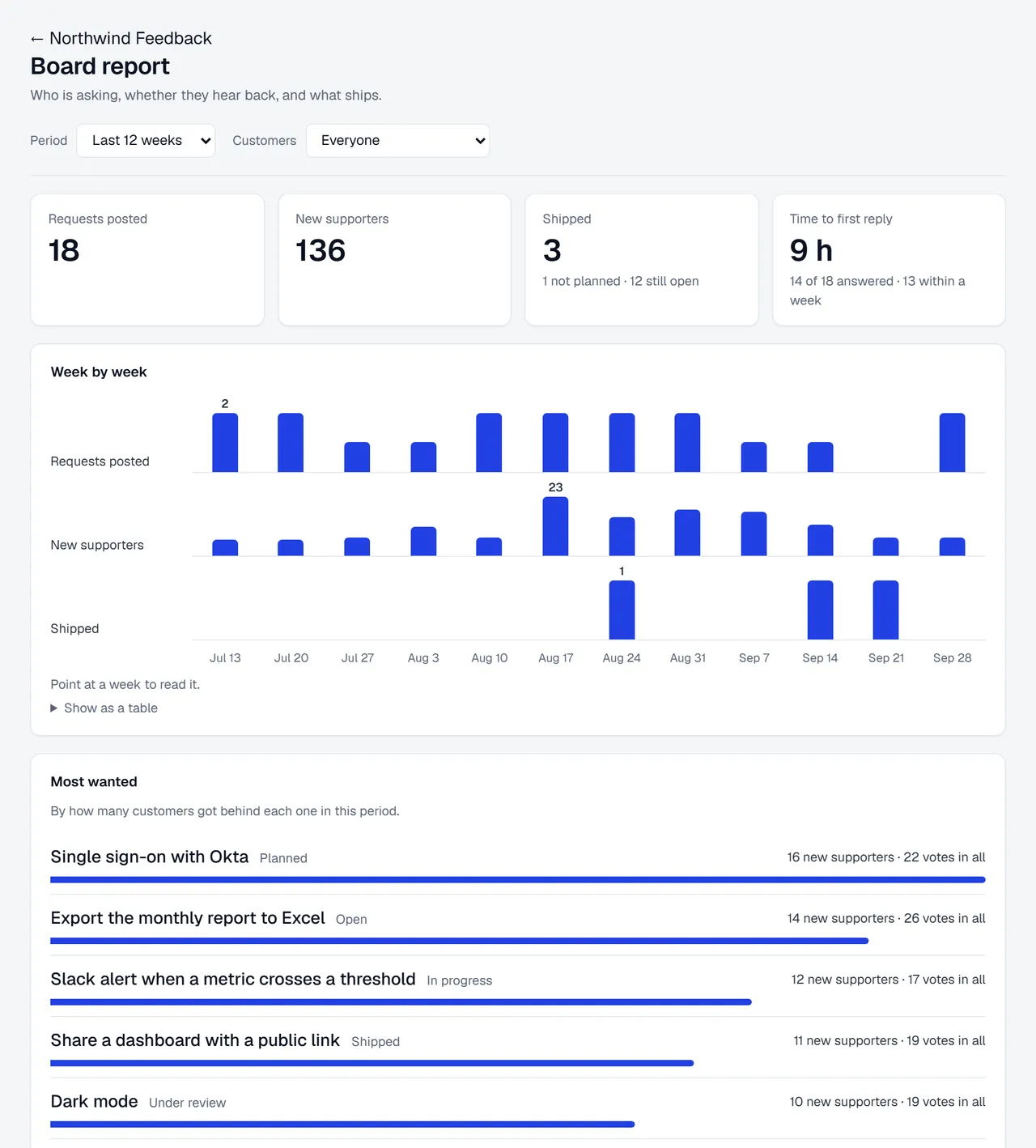
Are people still asking? Do they hear back? Do you ship what they ask for? The report answers all three, week by week.
Requests, new supporters and what shipped
Counted in people, not clicks: a supporter is someone who got behind a request that week.
Time to first reply
How long people wait to hear from your team, and who is still waiting.
One group at a time
Narrow the whole report to your enterprise accounts, or any group your customer data describes.
- Export the monthly report to Excel, 38 votes. The need behind it, getting month-end numbers to an accountant, came up with 11 customers.
- Single sign-on for our team, 41 votes.
MCP-enabled board
Ask the board a question.
The board speaks the Model Context Protocol. Connect Claude, Cursor or any MCP client and ask what came in, what a request turned out to mean, or what customers keep asking for that nobody has picked up.
Give it permission to make changes and it can approve, reply, move and merge requests too. It's asked to show you a reply before posting it, because your customers read it.
One command for Claude Code, then sign in with Outcomify. The same server holds your trees. More on MCP
Everything else a board needs
Built for the team that runs it.
Alerts when requests arrive
The people who run the board get a notification, and an email for anything waiting for approval, at most once an hour.
Your own login
About ten lines in your backend and every request arrives attached to a customer you know. No second sign-in.
Customer data through the API
Push who your customers are and what their accounts are worth, and pull requests back with the IDs your warehouse joins on.
Webhooks
Every board event sent to your URL, signed, with a delivery log and one-click redelivery.
Excel export
Every request with the needs it turned out to be, or every comment, reply and status change, in a spreadsheet.
Merge duplicates
Fold one request into another. Someone who backed both counts once, at the stronger of their two votes.
Spam waits for a person
Content checks hold anything that looks like spam for review, even on a board that publishes on its own.
Comments when you want them
Customer discussion stays off until you turn it on: a public thread is a commitment somebody has to keep.
Privacy built in
Customers can delete themselves from the board, and exports never include email addresses.
The honest take
When a plain voting board is enough
If all you want is a public list people upvote, a changelog, and your board on your own domain, a dedicated feedback tool does that well and comes with ready-made integrations for issue trackers and CRMs. See how we compare with Canny.
Outcomify's board is for teams who want each request to feed their discovery: the need behind it, the customers who share it, and the work that answers it.
Frequently asked questions
The Outcomify feedback board
Keep exploring
How to prioritize feature requests
Count customers, not votes: a method you can use with any board.
Stop counting votes
What a vote count hides, and what to count instead.
Canny alternative
Where Outcomify and Canny overlap, and when to pick which.
Connect your AI agent
Let Claude or any MCP client read and work your board and your trees.
What is an Opportunity Solution Tree?
The map your board’s needs connect to.
Customer interviews to opportunities
The other half of your evidence: what customers tell you in conversation.
Walk into planning with reasons.
Set up a board in a couple of minutes. It starts as a draft only your team can see, until you publish it.